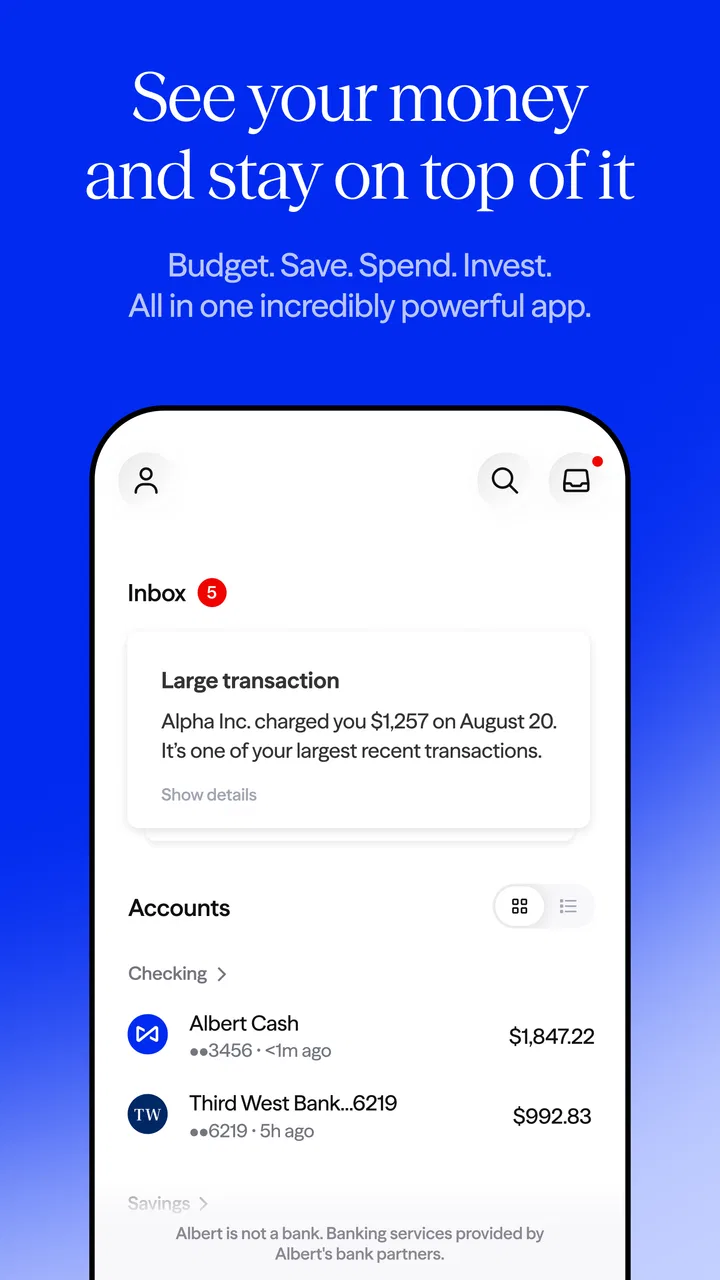
Albert: Budgeting and Banking
- 4.4
- Rating
- 10.00M
- Installs
- Free
- Price

 Analysis by App-foxy
Managing money usually becomes difficult at the exact moment life gets busy. A purchase is missing from your mental budget, a bill arrives earlier than expected, or a savings goal feels too vague to start. I reviewed Albert: Budgeting and Banking as a finance app built around bringing those everyday tasks into one place, and my impression is that its value depends less on flashy tools than on how consistently you connect it to your real spending habits.
The app is free, aimed at everyone, and developed by Albert - Budgeting & Banking. It has been available since January 30, 2019, and its current version is 10.0.37 for devices running Android 7.0 or later. With an average rating of 4.5 from around 150 thousand ratings and more than 5 million installs, it is clearly familiar to a large audience. Those figures do not replace personal testing, though. Finance apps are unusually sensitive to setup details, account connections, and the way each person prefers to control money.
Where Albert Can Feel Difficult at First
The first thing I noticed is that a combined budgeting, banking, saving, and investing app can create more questions than a simple expense tracker. A basic tracker asks you to record spending. Albert asks you to think about the wider picture: where your money is held, what your regular commitments look like, and how much flexibility you really have. That broader view is useful, but it also means the first session deserves more attention than downloading an ordinary calculator or notes app.
You May Also Like

 Blood Strike: 2.5 Anniversary
Blood Strike’s Loadouts Turn Every Drop Into a Tactical Gamble
A close look at Blood Strike’s custom loadouts: how fast access to signature weapons reshapes its battle royale rhythm, rewards preparation, and narrows the gap between fights.

 Pandora - Music & Podcasts
Pandora’s Music Is Easy to Start, but Harder to Recover
Pandora’s strength is its low-effort path from a seed to a station. Its weak spot is how much confidence it asks you to place in connection, setup, and quiet recovery.

 8 Ball Pool
 Is Built on Rivalries, Rematches, and Routine
A close look at the rivalries, rematches, shared routines, and unanswered safety questions that turn a quick pool match into a persistent mobile community.

 Samsung Music
’s Quiet Strength Is Playing What You Already Own
Its reach comes less from spectacle than from dependable access to a personal library. That simplicity is both the app’s strongest retention engine and its ceiling.

 AccuWeather: Weather Radar
AccuWeather Review: A Quick, Clear Forecast for Everyday Decisions
For everyday plans, the best forecast is the one you can understand quickly. AccuWeather makes rain timing, radar, and local conditions easy to act on, with a few trade-offs.

 Hill Climb Racing
Why Hill Climb Racing Still Turns Crashes Into One More Run
A tiny car, a bumpy hill and one more upgrade: Hill Climb Racing keeps resurfacing because its simple chaos makes every near-miss feel personal.
More From Our News Desk



Many users will probably get stuck when the information shown does not immediately match their own expectations. A recent purchase may not appear at once, a balance may look different from the amount in a familiar banking app, or a transaction may be grouped in a way that makes the budget seem wrong. My advice is not to start by changing every category or moving money around. First decide whether you are looking at a current balance, a pending activity, or a broader estimate of available money. Confusing those ideas is one of the fastest ways to lose confidence in any budgeting tool.
The most important habit is to treat the first week as a checking period, not as a final financial diagnosis. I would review the accounts and activity that Albert displays, compare them with the original bank or card source, and note anything that needs clarification. This is especially important if you use several accounts, share expenses with another person, or receive income on an irregular schedule. A budgeting app can organize information, but it cannot make an incomplete or delayed source record instantly complete.
What to check before judging the budget
Before relying on the app for a spending decision, I would check whether the accounts that matter most are represented and whether recent activity looks recognizable. Look for recurring bills, transfers between your own accounts, refunds, and card purchases that might still be processing. These items can make a budget appear healthier or tighter than it really is if they are interpreted too quickly.
I would also avoid making a large financial decision based on one screen during the setup period. If Albert shows a figure that surprises you, compare it with your bank statement or card application and consider timing. A transfer can be visible in one place before another, while a refund may take time to become part of the amount you mentally expect. This is not a reason to dismiss the app; it is a reason to use it as a planning aid rather than as an unquestioned replacement for the source account.
Another practical issue is household complexity. Albert may be comfortable for someone whose income and spending are mostly personal and straightforward. It is less immediately clear for a household where one person pays rent, another handles utilities, and both use different cards. In that situation, the app can still help reveal the overall pattern, but you may need a separate agreement with the other person about which expenses count toward shared goals. No app can infer every relationship or informal arrangement correctly.
Setup Checks That Make Daily Use Smoother
I would begin with one clear purpose instead of trying to use every part of the app immediately. For example, you might start by understanding monthly spending, then move to saving once the activity view makes sense. If you begin with budgeting, banking, saving, and investing all at once, it becomes harder to tell which part is helping and which part is simply unfamiliar.
During setup, keep your original financial apps available. Do not close them after connecting Albert, because they are useful reference points when a balance or transaction seems unexpected. I also recommend writing down the last few transactions you remember making. That gives you a quick reality check without requiring a detailed spreadsheet, and it helps identify whether the issue is a missing activity item or simply a purchase you forgot.
Use a stable connection and give the app time to finish loading before repeatedly starting the same action. Repeating a connection attempt or tapping through screens while information is still updating can create confusion about what has actually completed. If a screen seems stuck, pause, leave the app, reopen it, and check the source account before trying again. Safe troubleshooting is better than making several changes at once.
Device preparation matters too. Since the app supports Android 7.0 and later, an older compatible phone may still run it, but performance can depend on available storage, memory, and the condition of the operating system. Keeping the app and system updated when updates are available is sensible, while clearing important financial information or reinstalling should not be your first reaction. Reinstalling can complicate access if you are not certain that you remember the correct sign-in details.
One useful setup technique is to separate “known” from “needs review.” Known items are regular income, familiar bills, and purchases you can identify. Needs review includes transfers, refunds, unusual card activity, and anything that looks duplicated. This simple mental split prevents you from treating every unfamiliar line as an error. It also makes your first budget adjustments more deliberate.
A realistic first-week routine
Imagine that I receive my pay, pay rent, use a card for groceries, and make a small purchase on the way home. Instead of checking Albert once and assuming the result is final, I would look at the overall picture after the main transactions have had time to appear. I would compare the rent and grocery entries with my bank and card records, then ask whether the remaining amount is genuinely available or already committed to an upcoming bill.
At the end of the week, I would review patterns rather than criticize individual purchases. If several small food purchases are making the month feel tighter than expected, that is more useful than labeling one purchase as irresponsible. If a transfer is being mistaken for spending, I would correct my interpretation before changing my plan. This approach turns Albert into a feedback tool instead of a source of guilt.
For irregular income, I would use a conservative figure when planning. Do not build a budget around your best month if your earnings vary. Keep expected income separate in your thinking from money that has actually arrived, and check the app against your real balance before committing to a saving or investing decision. That distinction is one of the most valuable safeguards for freelancers, seasonal workers, and anyone whose pay changes.
Recovering When the Workflow Goes Wrong
When something looks incorrect, I would follow a calm sequence. First, identify the exact problem: missing activity, an unexpected balance, a duplicated item, or an action that did not appear to finish. Next, compare the same period in the relevant bank or card source. Then check whether the difference could be explained by a pending transaction, transfer timing, refund, or a simple date mismatch.
If the source account also looks wrong, Albert is probably displaying the same underlying situation rather than causing it. If the source is correct but the app still looks different after reopening, record the details before contacting support or taking further action. The useful details are the account involved, the approximate transaction date, the amount, and what each screen shows. Clear notes make troubleshooting much more efficient than saying only that the budget is broken.
I would avoid deleting and recreating information repeatedly. In a finance workflow, repeated corrections can make it harder to remember what happened originally. Take a screenshot for your own reference if appropriate, but protect sensitive account details when sharing anything with another person. The safest recovery process changes one thing at a time and verifies the result before moving on.
There is also a difference between a display problem and a planning problem. If Albert shows a transaction correctly but the budget feels unrealistic, the solution may be to rethink the plan rather than repair the app. A budget that ignores annual expenses, irregular bills, or shared purchases will fail even when every transaction is displayed perfectly. I found this distinction helpful because it keeps technical troubleshooting from becoming an excuse to avoid an uncomfortable spending pattern.
When patience is better than another adjustment
Financial information does not always move at the same speed across services. If a payment was made recently, waiting and checking again later can be more sensible than repeatedly refreshing or changing categories. The same applies to refunds and transfers. A short delay does not automatically mean that Albert has lost the information or that your money has disappeared.
However, waiting should not mean ignoring a genuinely unfamiliar transaction. If an entry is not yours, use the original financial institution’s normal security and dispute process rather than assuming that a budgeting app can resolve the underlying account issue. Albert can help you notice activity, but the institution holding the account is the appropriate place to investigate unauthorized use or account-level problems.
For sign-in trouble, I would start with the basics: confirm the account details, check the connection, reopen the app, and make sure the device meets the minimum Android requirement. I would not share passwords or sensitive financial information in public discussions. If those checks do not help, use the app’s own support route and describe the problem precisely. A careful explanation is more useful than repeatedly attempting actions that may lock you out or create duplicate requests.
When Albert Is Not the Cause, and When It Is Not the Best Choice
It is tempting to blame the newest app whenever a financial number looks surprising, but the cause may be a bank’s pending-transaction rules, a delayed card update, a refund still in progress, or an account transfer that has not settled everywhere. Comparing Albert with the original account is the quickest way to separate those situations. If both show the same information, the app is likely doing its job as a viewer of your financial activity.
Albert is a strong fit for someone who wants budgeting connected with broader money tasks and prefers a guided view over maintaining a detailed spreadsheet. It can also suit a person who tends to forget small purchases and benefits from seeing activity collected in one place. The free price makes it easy to try without committing money simply to learn whether the workflow matches your habits.
I would be more cautious recommending it to someone who wants complete manual control over every category, custom formula, and historical adjustment. A spreadsheet or a dedicated manual budgeting system may be better for people who enjoy assigning every transaction themselves or who need a highly customized household model. Likewise, if you only want a simple ledger with no broader banking or saving context, Albert may feel more involved than necessary.
It is also not the right answer for someone who expects an app to make financial choices without review. The presence of saving or investing functions does not remove the need to understand timing, risk, access to cash, and personal priorities. I would use those areas carefully, especially when income is unstable or emergency funds are limited. Convenience is helpful, but it should not replace judgment.
Compared with a traditional bank app, Albert is more focused on organizing the money picture and encouraging planning rather than only showing an account balance and recent transactions. Compared with a spreadsheet, it requires less manual maintenance but gives you less freedom to design every detail yourself. Compared with a basic expense tracker, it aims at a wider workflow. The trade-off is clear: less effort than building everything by hand, but more setup and interpretation than recording purchases in a simple list.
My Practical Verdict After Using the Workflow
My overall view is positive, with an important condition: Albert works best when I treat it as a regular checkpoint, not an automatic financial authority. Its appeal comes from connecting everyday budgeting with banking, saving, and investing in one finance app. That can make money management feel less fragmented, particularly for someone who currently jumps between several tools.
The strongest practical benefit is the chance to notice patterns early. A person may not remember every small purchase, but a consolidated view can make the month’s direction easier to understand. The app is also approachable for people who do not want to build a complex spreadsheet. Its broad audience, 4.5 average rating, and more than 5 million installs suggest that many people find the general approach useful, though popularity alone should not decide whether it fits you.
The main friction is that financial information needs interpretation. A delayed transaction, transfer, refund, or shared expense can make the first impression confusing. I would not skip the setup checks, and I would keep the original bank and card apps available for confirmation. Once the workflow becomes familiar, those checks take little effort and protect you from making decisions based on a misleading snapshot.
For a friend, I would recommend trying Albert if you want a free way to bring budgeting and related money tasks closer together, and if you are willing to spend time understanding how your own accounts appear inside it. Start with one goal, verify the first transactions, and make small adjustments. If you want a fully manual system, a highly specialized investment platform, or a minimal record of spending, another option may suit you better.
In short, I see Albert as a useful organizer rather than a substitute for financial awareness. It can help turn scattered activity into a routine, but the quality of the result depends on your review habits and the accuracy of the underlying accounts. Used with that realistic expectation, it is an accessible choice for everyday money management, available free of charge and rated for everyone.
FAQs for Albert: Budgeting and Banking
01What features does Albert offer for budgeting and banking?
Albert provides a comprehensive suite of features designed to simplify personal finance management. It offers automated budgeting tools, spending analysis, savings recommendations, and even investment advice. Additionally, users can connect their bank accounts to monitor transactions and balances in real-time, ensuring a complete overview of their financial situation.
02Is Albert secure for managing my financial information?
Yes, Albert prioritizes user security by employing advanced encryption and secure connections to protect your data. The app uses bank-level security protocols, and your sensitive information is never stored on your device. Additionally, Albert is committed to privacy and does not sell your data to third parties, ensuring a secure and private experience.
03How does Albert help with savings and investments?
Albert offers personalized savings recommendations based on your financial habits and goals. The app's "Genius" feature provides human advice to optimize your savings strategy. For investments, Albert offers guidance on building a diversified portfolio with low fees, making it accessible for beginners and seasoned investors alike.
04Can Albert work with multiple bank accounts?
Yes, Albert allows users to link multiple bank accounts, providing a centralized view of all their financial activities. This feature helps users track spending, manage budgets, and monitor financial trends across different accounts, making financial management more convenient and effective.
05Is there a cost associated with using Albert?
Albert is free to download and use, with a range of features available at no cost. However, for enhanced services like personalized financial advice from the "Genius" feature, users can opt for a subscription. This subscription is optional and provides additional insights and support for those seeking more personalized financial guidance.
Pros
- User-friendly interface for easy navigation.
- Offers smart savings recommendations.
- Tracks expenses automatically with ease.
- Provides cash advances with no interest.
- 24/7 customer support via chat.
Cons
- Limited investment options available.
- Only available in the USA.
- No option for joint accounts.
- Some features require a subscription.
- Occasional app performance issues.

Albert: Budgeting and Banking
Gallery